
Contents:
1. Basic python
- Statement Assignment
- print()
- list/list slice
- for loop + list (range)
- while loop
- str()
- function
2. Third-party modules
Check Modules Exist
You don't need to install time/datetime/threadin/subprocess, because they are in standard library.
Without Error Massage!!
import time
import datetime
import threading
import subprocess
Let's Start!
- Unix epoch is a time reference commonly used in programming
- Start calculated the seconds form 12 AM on January 1, 1970
- The time.time() function returns the number of seconds since that moment as a float value
In [1]:
import time
time.time()
Out[1]:
In [2]:
startTime = time.time()
result = 1
for i in range(1, 10):
    result = result * i
    print(i, result)
endTime = time.time()

duration = endTime - startTime
print('Cost time : %s' %(duration))
time.sleep() Function
In [3]:
import time
time.sleep(5)
print('Wakeup Now!')
Notice!
- If you enter time.sleep(5), you’ll see that the next prompt (>>>) doesn’t appear until five seconds have passed
- Be aware that pressing CTRL-C will not interrupt time.sleep() in python IDLE
- python IDLE introduction: https://docs.python.org/3/library/idle.html
To work around this problem, use a for loop...
import time
for i in range(5):
    time.sleep(1)
print('Wakeup Now!')
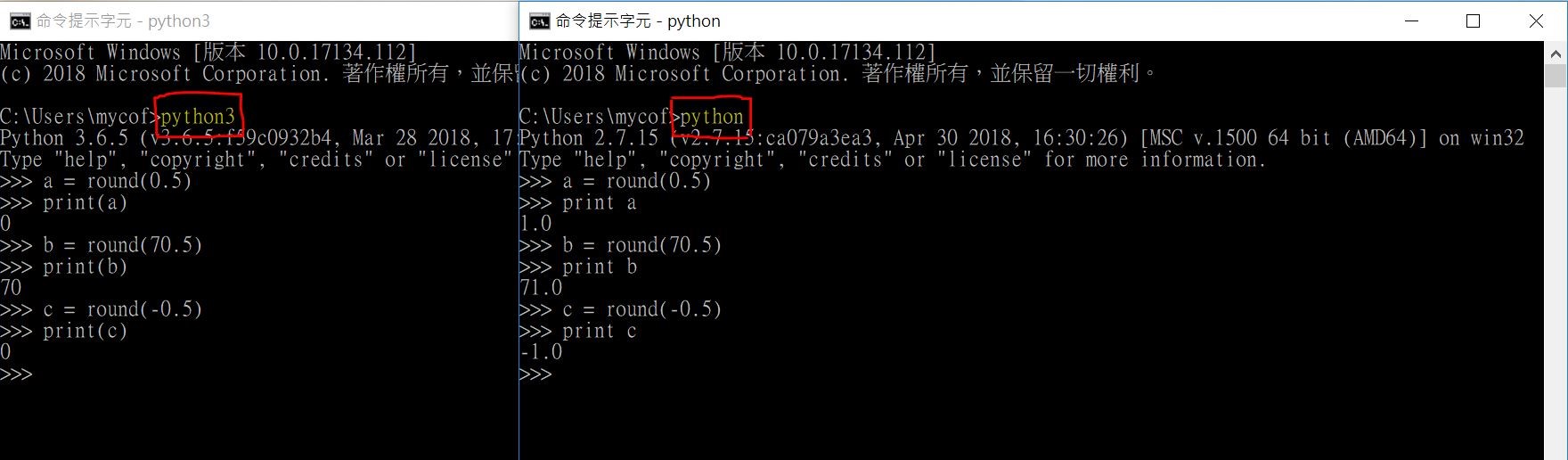
In [4]:
import time
now = time.time()
print (now)
In [5]:
round(now)
Out[5]:
In [6]:
round(now, 1)
Out[6]:
In [7]:
round(now, 3)
Out[7]:
Datetime Module
- Display a date in a more convenient format
- Can do arithmetic with dates (e.g. : show the day of 30 days ago)
In [8]:
import datetime

#Get localtime
datetime.datetime.now()
Out[8]:
In [9]:
#Get UTCtime
datetime.datetime.utcnow()
Out[9]:
In [10]:
now = datetime.datetime.now()
now.year, now.month, now.day, now.hour, now.minute, now.second
Out[10]:
In [11]:
datetime.datetime.fromtimestamp(1000000)
Out[11]:
In [12]:
datetime.datetime.fromtimestamp(time.time())
Out[12]:
Datetime Could Apply with Comparison
In [13]:
NewYear = datetime.datetime(2018, 1, 1)
ChristmasDay = datetime.datetime(2018, 12, 25)
In [14]:
NewYear == ChristmasDay
Out[14]:
In [15]:
NewYear < ChristmasDay
Out[15]:
In [16]:
NewYear != ChristmasDay
Out[16]:
In [17]:
delta = datetime.timedelta(days=10, hours=10, minutes=10, seconds=10)
delta.days, delta.seconds
Out[17]:
In [18]:
delta.total_seconds()
Out[18]:
Notice!
- There is no month or year keyword argument for input and output
- Input: weeks, days, hours, minutes, seconds, milliseconds, microseconds
- Output: days, seconds, microseconds, total_seconds
In [19]:
delta = datetime.timedelta(weeks=1, days=10, hours=10, minutes=10, seconds=10)
delta.days, delta.seconds
Out[19]:
It could carry over
In [20]:
delta_2 = datetime.timedelta(days=10, hours=34, minutes=10, seconds=10)
delta_2.days, delta_2.seconds
Out[20]:
In [21]:
delta = datetime.timedelta(days=10, hours=10, minutes=10, seconds=10, milliseconds=1000)
delta.days, delta.seconds
Out[21]:
Datetime Calculate with Operators
In [22]:
import datetime
dt = datetime.datetime.now()
dt
Out[22]:
In [23]:
thousandDays = datetime.timedelta(days=1000)
In [24]:
dt + thousandDays
Out[24]:
In [25]:
dt + thousandDays*10
Out[25]:
Converting datetime Objects into Strings
| Strftime Directive | Meaning |
|---|---|
| %Y | Year with century, as in '2014' |
| %y | Year without century, '70' to '99' (1970 to 1999) & '00' to '69' (2000 to 2069) |
| %m | Month as a decimal number, '01' to '12' |
| %B | Full month name, as in 'November' |
| %b | Abbreviated month name, as in 'Nov' |
| %d | Day of the month, '01' to '31' |
| %j | Day of the year, '001' to '366' |
| %w | Day of the week, '0' (Sunday) to '6' (Saturday) |
| %A | Full weekday name, as in 'Monday' |
| %a | Abbreviated weekday name, as in 'Mon' |
| %H | Hour (24-hour clock), '00' to '23' |
| %I | Hour (12-hour clock), '01' to '12' |
| %M | Minute, '00' to '59' |
| %S | Second, '00' to '59' |
| %p | 'AM' or 'PM' |
.strftime(format)
In [26]:
import datetime
oct14st = datetime.datetime(2018, 10, 14, 17, 2, 3)
oct14st.strftime('%Y/%m/%d %H:%M:%S')
Out[26]:
In [27]:
oct14st.strftime('%I:%M %p')
Out[27]:
In [28]:
oct14st.strftime("%B of '%y")
Out[28]:
In [29]:
datetime.datetime.strptime('October 14, 2018', '%B %d, %Y')
Out[29]:
In [30]:
datetime.datetime.strptime('2018/10/14 01:02:03', '%Y/%m/%d %H:%M:%S')
Out[30]:
In [31]:
datetime.datetime.strptime("October of '18", "%B of '%y")
Out[31]:
Multithreading
import time, datetime

startTime = datetime.datetime(2029, 10, 31, 0, 0, 0)
while datetime.datetime.now() < startTime:
    time.sleep(1)

print('Program now starting on Halloween 2029')
- For the example above, your program cannot do anything while waiting till 2029/10/31
- This is because Python programs by default have a single thread of execution
For Avoiding this Problem, Try "Multithreaded Program" Now!
Normal Program V.S. Threading Program
Normal Program
In [32]:
import threading, time

print('Start of program.')

def takeANap():
    time.sleep(5)
    print('Wake up!')

takeANap()

print('End of program')
Threading Program
In [33]:
import threading, time

print('Start of program.')

def takeANap():
    time.sleep(5)
    print('Wake up!')

threadObj = threading.Thread(target=takeANap)
threadObj.start()

print('End of program')
In [34]:
print('Cats', 'Dogs', 'Frogs', sep=' & ')
In [35]:
import threading
threadObj = threading.Thread(target=print, args=['Cats', 'Dogs', 'Frogs'], kwargs={'sep': ' & '})
threadObj.start()
Notice!
- The concurrency issues may happen when threads read and write variables at the same time.
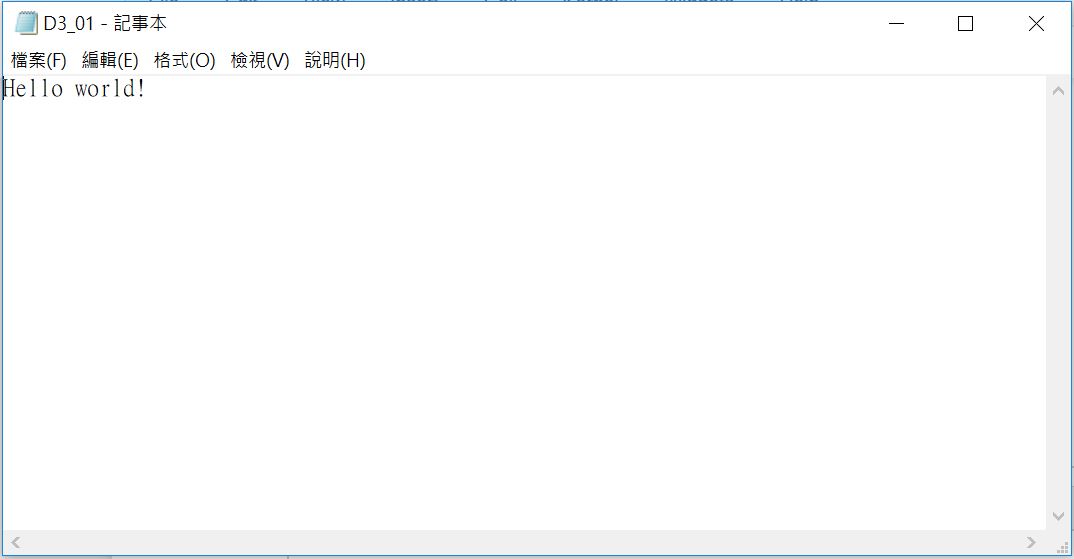
Create an New Text File and Open with Default Application
In [38]:
fileObj = open('D3_01.txt', 'w')
fileObj.write('Hello world!')
fileObj.close()

import subprocess
subprocess.Popen(['start', 'D3_01.txt'], shell=True)
Out[38]:
In [39]:
fileObj = open('D3_02.py', 'w')
fileObj.write('print("Hello Jamie!")')
fileObj.close()

subprocess.Popen([r'C:\Program Files\Python36\python3.exe', 'D3_02.py'])
Out[39]:

Project : Create a Task for Out-of-office Notification
- Choose notification picture you like
- Count for the current DateTime
- Before the time you could get off, use time.sleep(1) and refresh the current time at the end of loop
- If times up, open picture with subprocess.Popen()

import time, datetime, subprocess
In [40]:
import time, datetime, subprocess

now = datetime.datetime.now()
print(now)

while now.minute!=42:
    time.sleep(1)
    now = datetime.datetime.now()
    print(str(now.minute)+':'+str(now.second), end='>')

subprocess.Popen(['start', 'snoopy.JPG'], shell=True)
Out[40]:
Exercise
Answer
In [41]:
import time, subprocess

timeLeft = 5
while timeLeft > 0:
    print(timeLeft, end='>')
    time.sleep(1)
    timeLeft = timeLeft - 1

subprocess.Popen(['start', 'Sleep_Away.mp3'], shell=True)
Out[41]: